
Complete 11-Step Master Walkthrough

How to Complete a CP12 Gas Safety Record on Mobile

Complete end-to-end walkthrough: From 1-tap landlord directory pre-fills and appliance checks to Fast-Track real-time customer signing and instant multi-party PDF dispatch.

Directory Pre-fill

1-tap saved Landlords & Premises

Fast-Track

Pre-signed with Gas Safe ID

Real-Time Signing

On-site touchscreen tenant sign-off

Auto-Dispatch

Instant PDF copies to Landlord & Agent

Part 1: Directory Pre-fill & Safety Checklist

Quickly populate landlord details from your directory, record appliance checks, and launch Fast-Track mode.
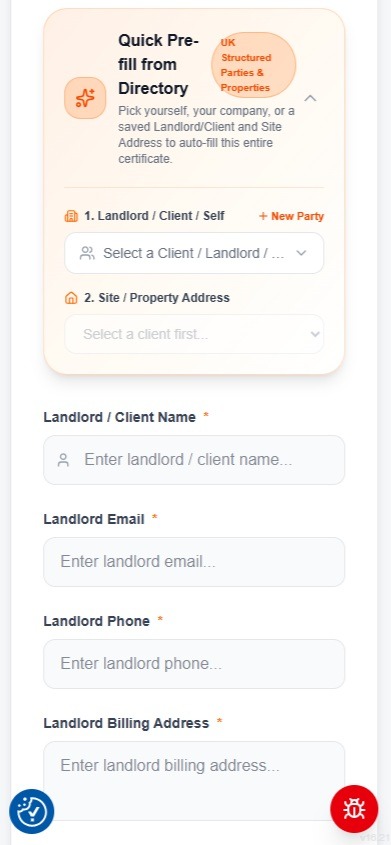
Quick Pre-fill from Directory card showing Landlord, Client and Site Property Address selection
Click to Zoom
Tap image to view high-resolution screenshot
01Smart Directory

Quick Pre-fill from Directory (Landlords & Properties)

1-tap auto-fill for recurring landlords, letting agents and rental premises

Save hours of repetitive typing on-site by selecting from your pre-saved UK Structured Parties and Property Directory. Selecting a saved Landlord or Letting Agent instantly auto-fills Landlord Name, Email, Phone, and Billing Address, plus linked rental site addresses across the entire certificate.
Instantly select recurring landlords, estate agents, or property management companies
Auto-populates site property addresses and landlord billing details in 1 tap
Eliminates repetitive data entry and prevents costly typos in landlord email addresses
Pro-Tip: Select a client from the dropdown to populate Section 1 & 2 in a fraction of a second.
EsignKit CP12 Section 3 Gas Installation Checks and Alarms verification on mobile
Click to Zoom
Tap image to view high-resolution screenshot
02Installation Checks

Complete Gas Installation & Alarm Checks

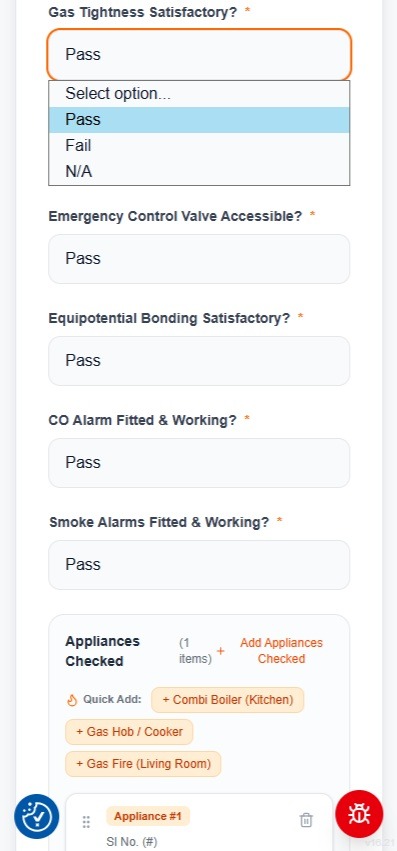
Section 3 safety checklist with 1-tap dropdowns

Complete the Section 3 gas installation checklist using responsive mobile dropdowns: Gas Tightness, Emergency Control Valve accessibility, Equipotential Bonding, and CO & Smoke alarm verification.
Mandatory Pass / Fail / N/A dropdowns prevent missing inspection entries
Automatic CO and Smoke alarm compliance check verification
Touch-friendly form fields designed for fast thumb entry on mobile devices
Pro-Tip: Select 'Pass' for satisfactory checks or flag defects for immediate warning notice generation.
Section 4 Appliance Inspection Matrix with Quick-Add Combi Boiler, Hob, and Fire buttons
Click to Zoom
Tap image to view high-resolution screenshot
03Appliance Matrix

Add Inspected Gas Appliances with Quick-Add

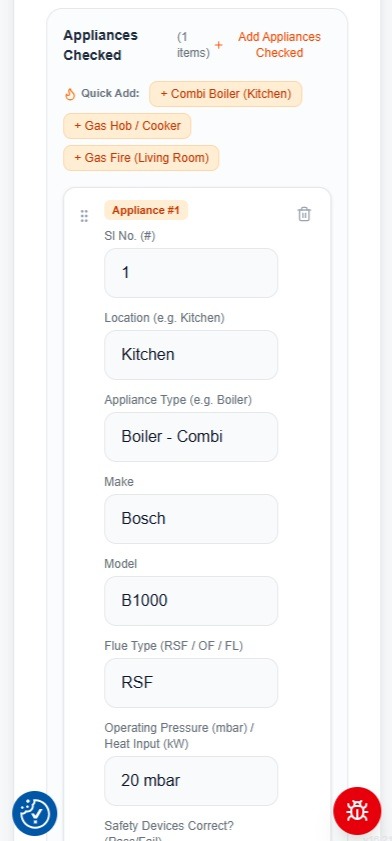
Section 4 multi-appliance inspection matrix

Add all gas appliances at the property (boilers, hobs, fires, water heaters). Use the 1-tap Quick-Add buttons (e.g. '+ Combi Boiler (Kitchen)', '+ Gas Hob / Cooker', '+ Gas Fire') to pre-fill common appliance types, then enter make, model, flue type, and operating pressure.
1-tap Quick-Add buttons for instant appliance configuration
Records operating pressure (mbar) / heat input (kW) and safety device status
Easily add multiple appliances on one certificate or delete redundant rows
Pro-Tip: Tap '+ Combi Boiler (Kitchen)' to populate standard kitchen boiler defaults in 1 second.
Section 5 Defects, Remedial Actions & Warning Notices form fields
Click to Zoom
Tap image to view high-resolution screenshot
04Defects & Warnings

Record Defects, Remedial Actions & Warning Notices

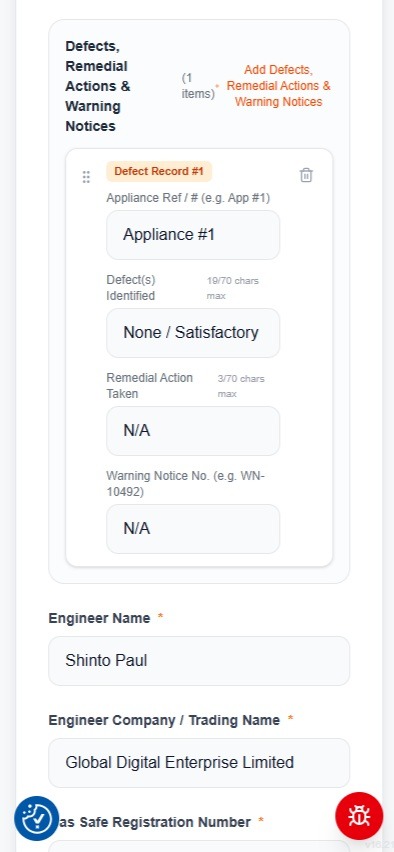
Section 5 safety notices and defect management

Document any defects identified during the inspection. For safe installations, the system defaults to 'None / Satisfactory' with 'N/A' for remedial actions. If defects exist, record the warning notice number (e.g. WN-10492) and remedial actions taken.
Default 'None / Satisfactory' saves time on clean annual checks
Character counters guide concise, compliant remedial notes
Direct link to official Gas Safe Warning Notice references if required
Pro-Tip: Clear defect descriptions ensure complete legal protection in case of landlord disputes.
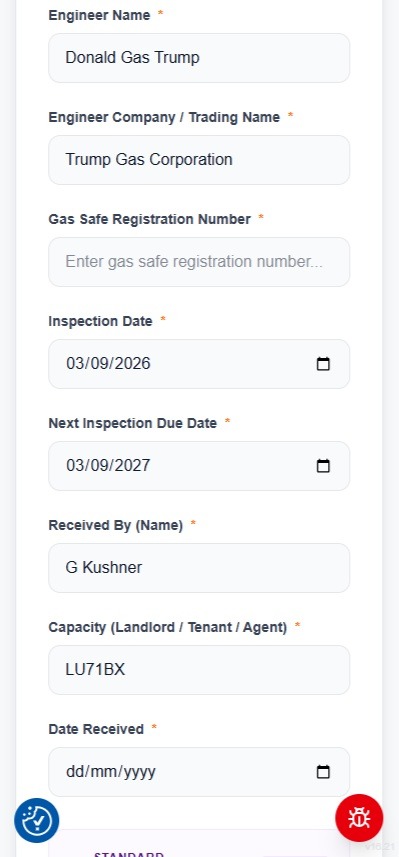
Section 6 Engineer Declaration details and Section 7 Customer name and inspection dates
Click to Zoom
Tap image to view high-resolution screenshot
05Engineer Credentials

Verify Gas Safe Credentials & Next Due Date

Section 6 declaration and Section 7 recipient details

Your Engineer Name, Trading Name, and Gas Safe Registration Number are automatically populated from your verified profile. The inspection date is set to today, and the next due date is automatically calculated to +12 months. Enter the tenant or customer name present.
Automatic Gas Safe Registration Number binding
Automatic +12 Month Next Inspection Due Date calculation
Pre-populates customer/tenant name and capacity (Tenant / Landlord / Agent)
Pro-Tip: Next due date is automatically set to exactly 1 year ahead for annual compliance tracking.
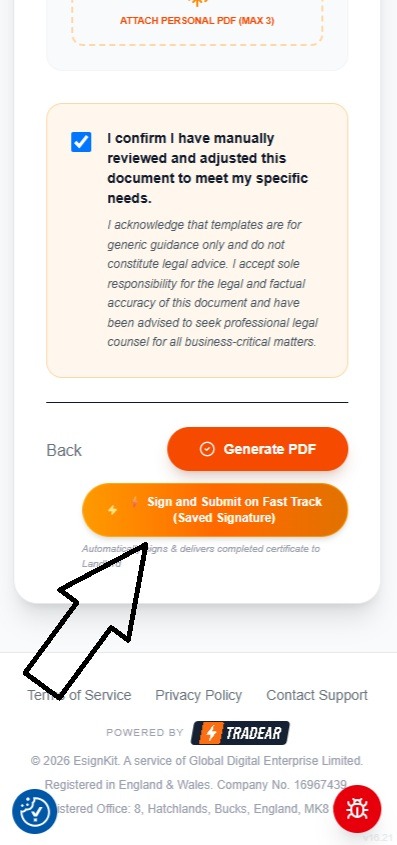
Fast-Track Sign and Submit button with confirmation checkbox
Click to Zoom
Tap image to view high-resolution screenshot
06Fast-Track Launch

Submit on Fast-Track with Saved Engineer Signature

Instant transition from form to interactive canvas

Check the review confirmation checkbox and tap the orange '⚡ Sign and Submit on Fast Track (Saved Signature)' button. EsignKit securely embeds your saved engineer signature into Section 6 and launches the interactive visual review canvas.

No need to re-draw your engineer signature every single job
Legally binds your certified signature into Section 6 automatically
Transitions directly to on-site customer signature capture in 1 tap
Pro-Tip: Tap 'Sign and Submit on Fast Track' to launch the real-time customer signing screen.
Part 2: Fast-Track Canvas, Live Customer Signing & Dispatch

Capture the tenant signature on-site, configure stakeholder email copies, and submit the certified record.
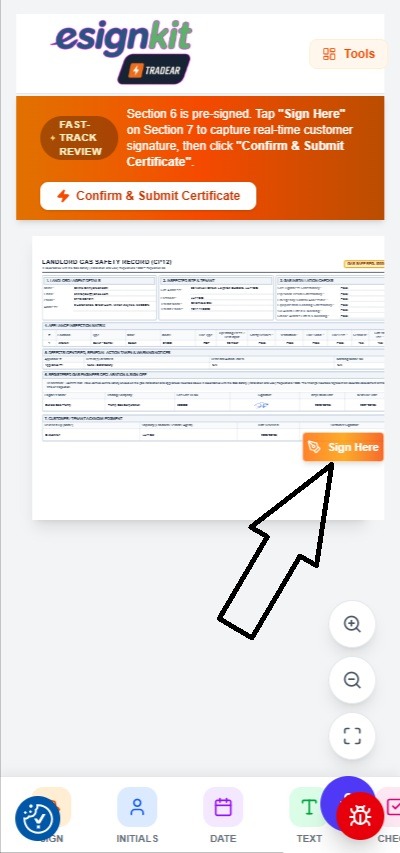
EsignKit CP12 Fast-Track Review Canvas showing Section 6 signed and Section 7 Sign Here button
Click to Zoom
Tap image to view high-resolution screenshot
07Canvas Review

Review Certificate & Locate Customer Sign-Off

Section 6 pre-signed; pulsing prompt over Section 7

The full CP12 document is rendered in crisp vector preview. Section 6 is already signed with your engineer signature. An orange review banner confirms Fast-Track mode and a pulsing 'Sign Here' badge points directly to Section 7 for the customer acknowledgment.
Visual preview of all 7 sections formatted to official Gas Safe standards
Section 6 already pre-signed with your stored engineer signature
Pulsing 'Sign Here' badge directs attention straight to Section 7
Pro-Tip: Tap the pulsing orange 'Sign Here' button over Section 7 to start customer capture.
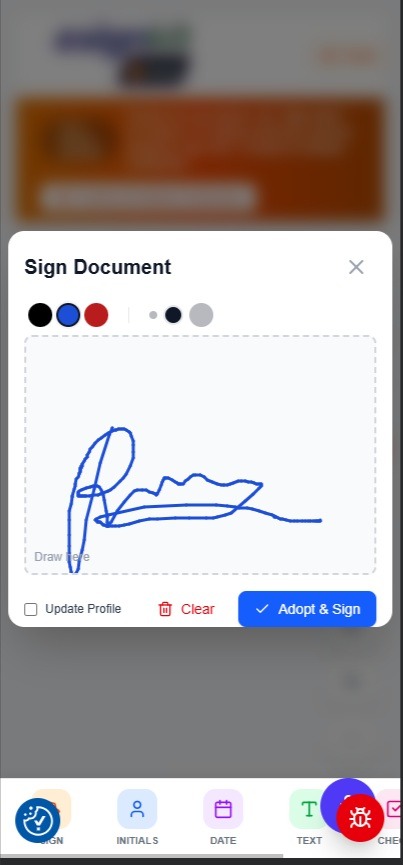
Touchscreen signature modal with signature drawn and Adopt & Sign button
Click to Zoom
Tap image to view high-resolution screenshot
08Live Customer Signature

Capture Real-Time Customer Signature On-Site

Touchscreen signature pad for tenant or landlord

The touchscreen signature pad opens. Hand your phone or tablet to the tenant or customer to draw their signature on screen in real time. Once drawn, tap 'Adopt & Sign' to place it directly into Section 7.
Smooth responsive drawing canvas with touch & stylus support
Color selection (black, blue, red) and 1-tap clear button
Instantly embeds customer signature with on-site timestamp into the certificate
Pro-Tip: Hand the device to the tenant to sign, then tap 'Adopt & Sign'.
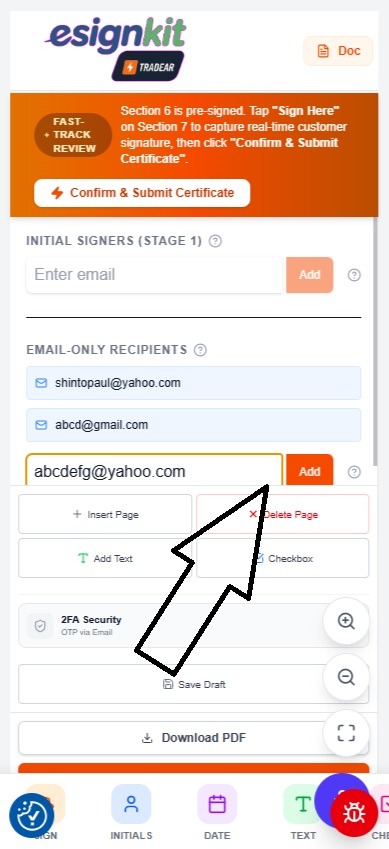
Tools panel showing Email-Only Recipients input and Add button
Click to Zoom
Tap image to view high-resolution screenshot
09Multi-Party Copies

Add Email-Only Recipients (Landlords, Agents, Tenants)

Deliver final PDF copies automatically upon submission

Tap the 'Tools' tab at the top right to open the drawer. Under 'EMAIL-ONLY RECIPIENTS', add the email addresses of landlords, letting agents, or property managers who require an instant copy of the completed certificate.
Add unlimited email recipients (landlords, agents, property managers, tenants)
Recipients receive the finalized PDF automatically with zero manual emailing needed
No login or account creation required for email recipients
Pro-Tip: Enter the landlord or estate agent's email address and tap 'Add'.
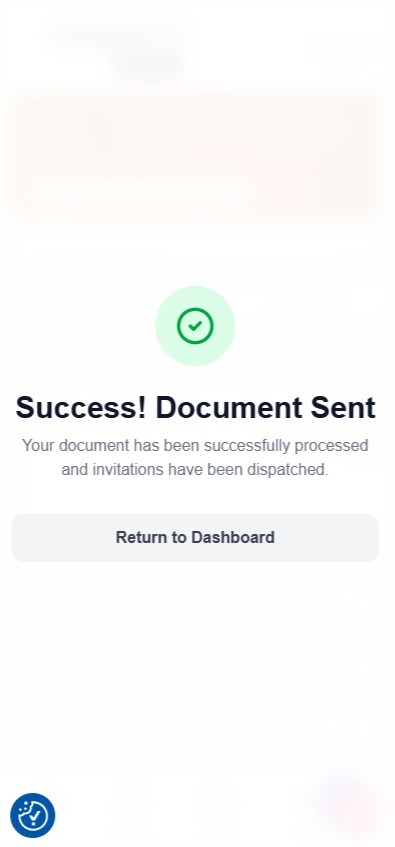
Success Document Sent confirmation screen with Return to Dashboard button
Click to Zoom
Tap image to view high-resolution screenshot
10Instant Cloud Dispatch

Confirm & Submit Certificate

Instant cryptographic sealing and multi-party email dispatch

Tap the prominent orange '⚡ Confirm & Submit Certificate' button. EsignKit burns both signatures into the document, generates the forensic audit report, and sends the final PDF to all recipients in seconds.
Server-side vector PDF burning guarantees crisp, tamper-evident quality
Immediate success confirmation screen with audit trail verification
Completed certificates delivered to all parties simultaneously
Pro-Tip: Your certificate is delivered and archived before you leave the customer property.
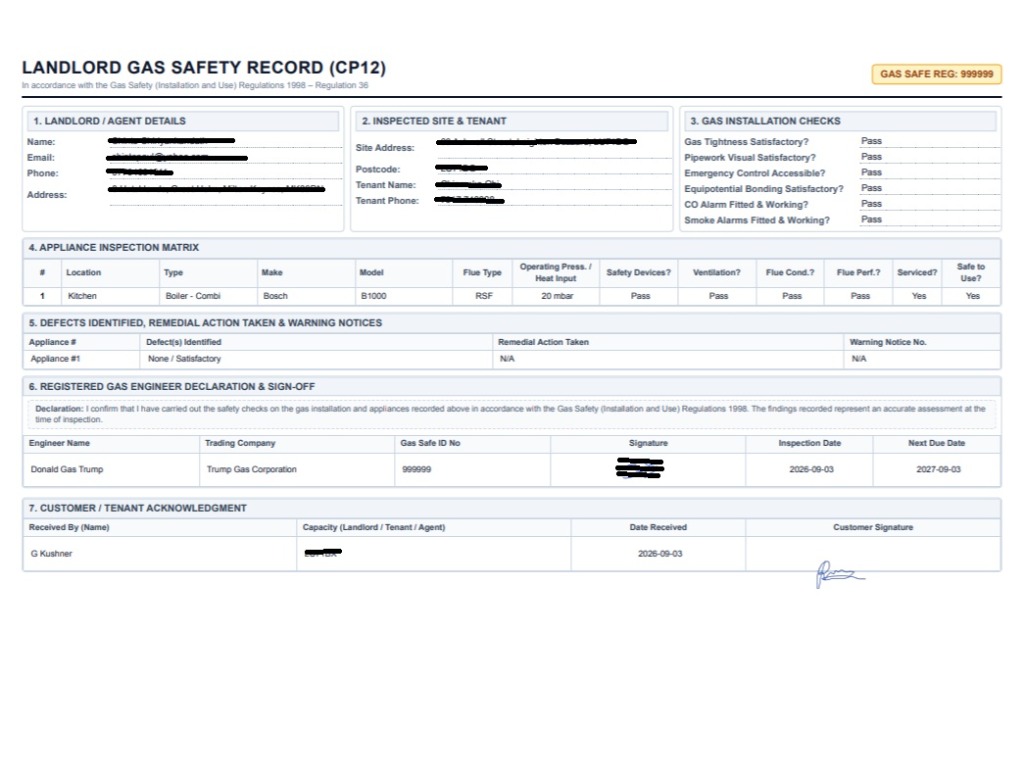
Completed Landlord Gas Safety Record CP12 Certificate showing all 7 sections signed
Click to Zoom
Tap image to view high-resolution screenshot
11Certified CP12

Finished Landlord Gas Safety Record

Laid out for the Gas Safety (Installation and Use) Regulations 1998

The finalized Landlord Gas Safety Record (CP12) is rendered in pristine, high-resolution PDF format with Section 1-5 appliance checks, Section 6 Gas Safe engineer declaration, Section 7 customer acknowledgment, and automated next due date calculations.
Covers the record a landlord must keep under Regulation 36
Includes Gas Safe registration ID, engineer signature, and customer signature
Permanent digital audit trail with 90+ day retrieval and certificate tracking
Pro-Tip: Both the landlord and tenant receive their official copy immediately in their inbox.

Digital Records and the Gas Safety Regulations 1998

Under Regulation 36 (Duties of Landlords), the gas safety record can be kept and shared electronically. EsignKit seals every certificate with timestamped signatures and a tamper-evident fingerprint, so you can show when it was issued and that it hasn't been changed since. The engineer who carries out the check remains responsible for what the record says.

Frequently Asked Questions

Everything you need to know about digital CP12 workflows

Q1.How does the Directory Pre-fill feature save time?

Directory Pre-fill stores your regular landlords, letting agencies, and their rental property portfolios. When starting a CP12, simply pick the landlord from your directory dropdown to instantly auto-fill their contact info and select the exact property address in one tap.

Q2.What is Fast-Track Review mode on EsignKit?

Fast-Track Review mode is tailored specifically for Gas Safe registered engineers. It automatically pre-populates and pre-signs Section 6 (Engineer Declaration) with your stored credentials so you only need to capture the customer signature on-site before instant dispatch.

Q3.Who receives the completed CP12 certificate?

Everyone listed under 'Email-Only Recipients' (landlord, property manager, letting agency, tenant) plus the engineer. All parties receive an official email containing the certified PDF and forensic audit report.

Q4.Is this digital CP12 legal under UK Gas Safety Regulations?

Yes. Regulation 36 of the Gas Safety (Installation and Use) Regulations 1998 allows electronic records provided they identify the engineer, record the required checks, and are secure against tamper. EsignKit seals every record with a SHA-256 cryptographic audit trail.

Q5.Can I use EsignKit on my mobile phone or tablet on-site?

Yes! EsignKit is 100% mobile-optimized for smartphones (iOS & Android) and tablets, as well as the native Voice Companion Android app for hands-free field engineers.

Complete 12-Slide Mobile Creative Suite

Facebook Mobile Feed Slideshow Ad Studio

Featuring smooth crossfade transitions, relaxed half-speed pacing, landscape panning for certificates, and instant 1-click export options for Meta Ads Manager / FB Studio.

Slide 01 of 12
Vertical Pan (Zoomed)
ES
Esignkit UK● Sponsored
Gas Safe CP12 Mobile Suite
1/12
Directory pre-fill dropdown for landlord contact and property address auto-population
Gas installation checks and alarm verification dropdowns
Section 4 Appliance inspection matrix with quick-add combi boiler and hob buttons
Section 5 Defects, remedial actions and Gas Safe warning notice entry
Section 6 Gas Safe engineer declaration and automated next due date calculations
Fast-Track sign and submit button with saved signature confirmation
Fast-Track visual review canvas showing Section 6 signed and pulsing customer sign-off prompt
Touchscreen customer signature drawing modal with Adopt & Sign button
Tools panel showing Email-Only Recipients input for landlords and property managers
Success document sent confirmation screen with audit trail verification
Completed Landlord Gas Safety Record CP12 Landscape Certificate showing all 7 sections signed
Esignkit TradeAR - Go Paperfree Tradespeople and UK Landlords Compliance
SMART PRE-FILLStep 01

Still writing CP12s by hand?

1-tap auto-fill for recurring landlords, letting agents, and rental premises from your directory.

⚡ Esignkit Mobile CP12Slide 01 of 12
Slide 01 Creative Specification
Pan: TOP → DOWN7.0s
Headline / Hook:

"Still writing CP12s by hand?"

Step Description:

1-tap auto-fill for recurring landlords, letting agents, and rental premises from your directory.

Screenshot Asset:/images/howto/cp12/step1-prefill-directory.jpg
Ready for Facebook Ads Manager
Facebook Primary Text & Ad Copy
Gas engineers: Stop losing your evenings to carbon-copy pads and lost paperwork. 🛑

With Esignkit, complete fully compliant CP12 Landlord Gas Safety Records on your mobile in under 2 minutes:
⚡ 1-Tap Landlord Pre-fill — No re-typing addresses
⚡ Section 3 Checks — Gas tightness, valves & alarms
⚡ Multi-Appliance Matrix — Quick-Add combi boilers & hobs
⚡ Fast-Track Signing — Auto-binds your Gas Safe registration
⚡ On-Glass Customer Sign-off — Capture tenant signature on-site
⚡ Instant PDF Dispatch — Landlord & agent get their copy before you start the van

✅ Fully compliant with UK Gas Safety Regulations 1998 (Reg 36).
👉 Try Esignkit Free Today: https://esignkit.co.uk/trades
Ad Headline:

Create & Send CP12s in 2 Mins ⚡

Description:

UK Gas Safe Engineers • Free Trial

Meta Ads Studio Export Guide

  • 1.Single Video Placement: Click "Export All 12 Slides (Video WebM)" above to generate a full 50-second relaxed-pacing video containing all 12 animated slides.
  • 2.Carousel Ad Format: Click "Download All 12 Slides" to get individual 1080×1920 (or 1080×1350) graphics for multi-card feed ads.
  • 3.Placement Restriction: In Facebook Ads Manager, set placements to Mobile Feeds & Stories only.

Ready to automate your CP12 certificates?

Built for UK gas engineers, plumbers and landlords who want the paperwork finished on site.

© 2026 EsignKit UK. All rights reserved. Compliant with UK Electronic Communications Act 2000 & Gas Safety Regulations 1998.

v16.21